A Powershell module to run threat hunting playbooks on data from Azure and O365 for Cloud Forensics purposes.
1. Check that you have the right O365 Permissions
The following roles are required in Exchange Online, in order to be able to have read only access to the UnifiedAuditLog: View-Only Audit Logs or Audit Logs.
These roles are assigned by default to the Compliance Management role group in Exchange Admin Center.
NOTE: if you are a security analyst, incident responder or threat hunter and your organization is NOT giving you read-only access to these audit logs, you need to seriously question what their detection and response strategy is!
More information:
- How to search the Audit Log using the GUI
- Manage role groups in Exchange Online
- How to enable the UnifiedAuditLog
NOTE: your admin can verify these requirements by running
Get-ManagementRoleEntry "*\Search-UnifiedAuditLog"in your Azure tenancy cloud shell or local powershell instance connected to Azure.
2. Ensure ExchangeOnlineManagement v2 PowerShell Module is installed
Please make sure you have ExchangeOnlineManagement (EXOv2) installed. You can find instructions on the web or go directly to my little KB on how to do it at the soc analyst scrolls
3. Either Clone the Repo or Install AzureHunter from the PSGallery
3.1 Cloning the Repo
- Clone this repository
- Import the module
Import-Module .\source\AzureHunter.psd1
3.2 Install AzureHunter from the PSGallery
All you need to do is:
Install-Module AzureHunter -Scope CurrentUser
Import-Module AzureHunter
What is the UnifiedAuditLog?
The unified audit log contains user, group, application, domain, and directory activities performed in the Microsoft 365 admin center or in the Azure management portal. For a complete list of Azure AD events, see the list of RecordTypes.
The UnifiedAuditLog is a great source of cloud forensic information since it contains a wealth of data on multiple types of cloud operations like ExchangeItems, SharePoint, Azure AD, OneDrive, Data Governance, Data Loss Prevention, Windows Defender Alerts and Quarantine events, Threat intelligence events in Microsoft Defender for Office 365 and the list goes on and on!
AzureHunter Data Consistency Checks
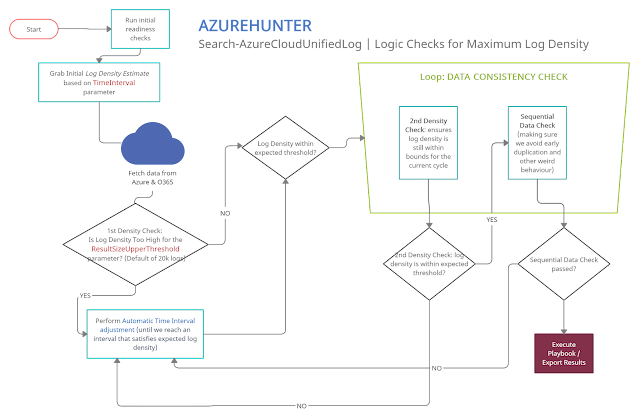
AzureHunter implements some useful logic to ensure that the highest log density is mined and exported from Azure & O365 Audit Logs. In order to do this, we run two different operations for each cycle (batch):
- Automatic Window Time Reduction: this check ensures that the time interval is reduced to the optimal interval based on the ResultSizeUpperThreshold parameter which by default is 20k. This means, if the amounts of logs returned within your designated TimeInterval is higher than ResultSizeUpperThreshold, then an automatic adjustment will take place.
- Sequential Data Check: are returned Record Indexes sequentially valid?
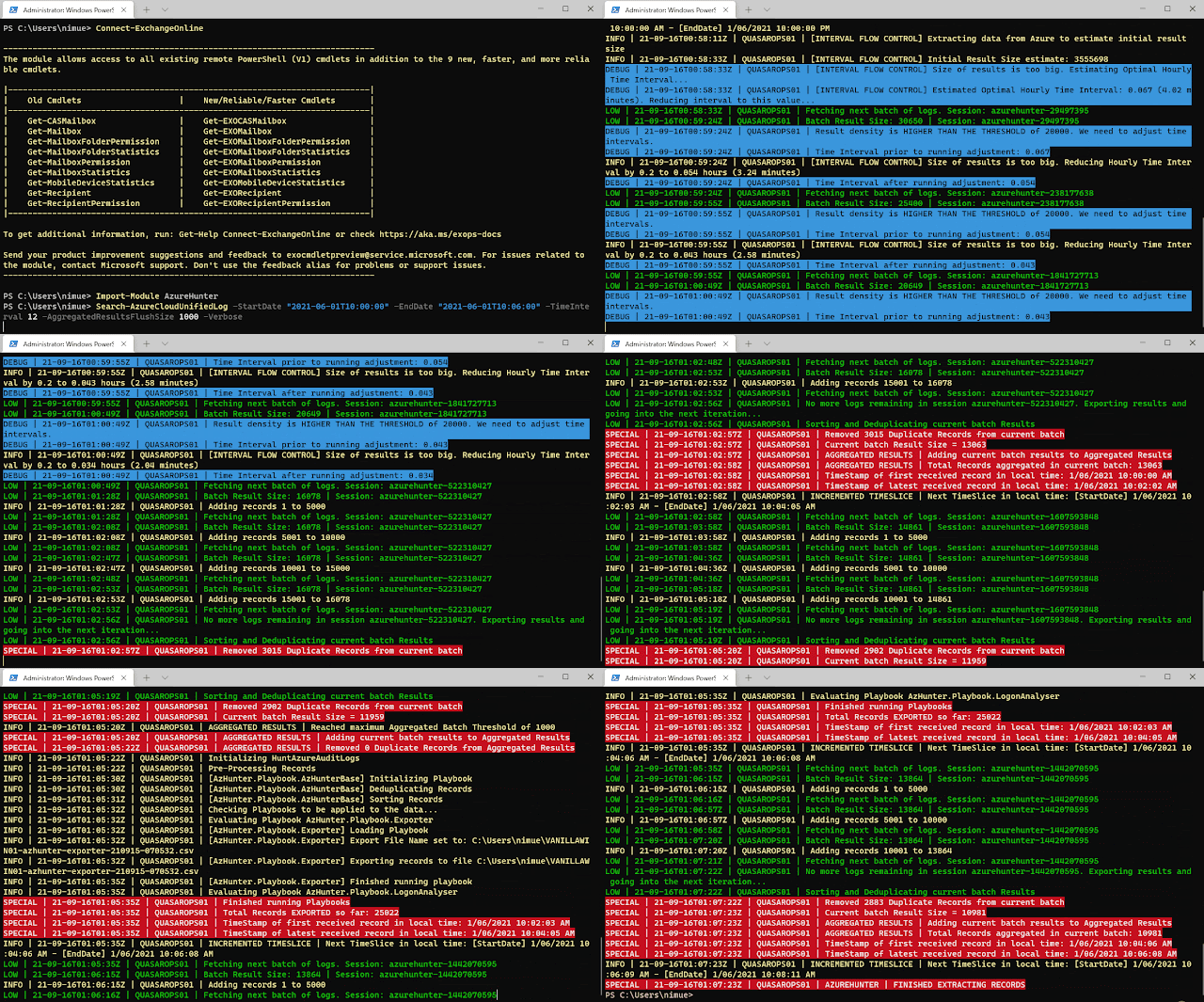
Ensure you connect to ExchangeOnline
It's recommended that you run Connect-ExchangeOnline before running any AzureHunter commands. The program checks for an active remote session and attempts to connect but some versions of Powershell don't allow this and you need to do it yourself regardless.
Run AzureHunter
AzureHunter has two main commands: Search-AzureCloudUnifiedLog and Invoke-HuntAzureAuditLogs.
The purpose of Search-AzureCloudUnifiedLog is to implement a complex logic to ensure that the highest percentage of UnifiedAuditLog records are mined from Azure. By default, it will export extracted and deduplicated records to a CSV file.
The purpose of Invoke-HuntAzureAuditLogs is to provide a flexible interface into hunting playbooks stored in the playbooks folder. These playbooks are designed so that anyone can contribute with their own analytics and ideas. So far, only two very simple playbooks have been developed: AzHunter.Playbook.Exporter and AzHunter.Playbook.LogonAnalyser. The Exporter takes care of exporting records after applying de-duplication and sorting operations to the data. The LogonAnalyser is in beta mode and extracts events where the Operations property is UserLoggedIn. It is an example of what can be done with the playbooks and how easy it is to construct one.
When running Search-AzureCloudUnifiedLog, you can pass in a list of playbooks to run per log batch. Search-AzureCloudUnifiedLog will pass on the batch to the playbooks via Invoke-HuntAzureAuditLogs.
Finally Invoke-HuntAzureAuditLogs can, be used standalone. If you have an export of UnifiedAuditLog records, you can load them into a Powershell Array and pass them on to this command and specify the relevant playbooks.
Example 1 | Run search on Azure UnifiedAuditLog and extract records to CSV file (default behaviour)
Search-AzureCloudUnifiedLog -StartDate "2020-03-06T10:00:00" -EndDate "2020-06-09T12:40:00" -TimeInterval 12 -AggregatedResultsFlushSize 5000 -VerboseThis command will:
- Search data between the dates in StartDate and EndDate
- Implement a window of 12 hours between these dates, which will be used to sweep the entire length of the time interval (StartDate --> EndDate). This window will be automatically reduced and adjusted to provide the maximum amount of records within the window, thus ensuring higher quality of output. The time window slides sequentially until reaching the EndDate.
- The
AggregatedResultsFlushSizeparameter speficies the batches of records that will be processed by downstream playbooks. We are telling AzureHunter here to process the batch of records once the total amount reaches 5000. This way, you can get results on the fly, without having to wait for hours until a huge span of records is exported to CSV files.
Example 2 | Run Hunting Playbooks on CSV File
We assume that you have exported UnifiedAuditLog records to a CSV file, if so you can then do:
$RecordArray = Import-Csv .\my-exported-records.csv
Invoke-HuntAzureAuditLogs -Records $RecordArray -Playbooks 'AzHunter.Playbook.LogonAnalyser'
You can run more than one playbook by separating them via commas, they will run sequentially:
$RecordArray = Import-Csv .\my-exported-records.csv
Invoke-HuntAzureAuditLogs -Records $RecordArray -Playbooks 'AzHunter.Playbook.Exporter', 'AzHunter.Playbook.LogonAnalyser'
Why?
Since the aftermath of the SolarWinds Supply Chain Compromise many tools have emerged out of deep forges of cyberforensicators, carefully developed by cyber blacksmith ninjas. These tools usually help you perform cloud forensics in Azure. My intention with AzureHunter is not to bring more noise to this crowded space, however, I found myself in the need to address some gaps that I have observed in some of the tools in the space (I might be wrong though, since there is a proliferation of tools out there and I don't know them all...):
- Azure cloud forensic tools don't usually address the complications of the Powershell API for the
UnifiedAuditLog. This API is very unstable and inconsistent when exporting large quantities of data. I wanted to develop an interface that is fault tolerant (enough) to address some of these issues focusing solely on the UnifiedAuditLog since this is the Azure artefact that contains the most relevant and detailed activity logs for users, applications and services. - Azure cloud forensic tools don't usually put focus on developing extensible
Playbooks. I wanted to come up with a simple framework that would help the community create and share new playbooks to extract different types of meaning off the same data.
If, however, you are looking for a more feature rich and mature application for Azure Cloud Forensics I would suggest you check out the excellent work performed by the cyber security experts that created the following applications:
I'm sure there is a more extensive list of tools, but these are the ones I could come up with. Feel free to suggest some more.
Why Powershell?
- I didn't want to re-invent the wheel
- Yes the Powershell interface to Azure's UnifiedAuditLog is unstable, but in terms of time-to-production it would have taken me an insane amount of hours to achieve the same thing writing a whole new interface in languages such as .NET, Golang or Python to achieve the same objectives. In the meanwhile, the world of Cyber Defense and Response does not wait!
TODO
- Specify standard playbook metadata attributes that need to be present so that AzureHunter can leverage them.
- Allow for playbooks to specify dependencies on other playbooks so that one needs to be run before the other. Playbook chaining could produce interesting results and avoid code duplication.
- Develop Pester tests and Coveralls results.
- Develop documentation in ReadTheDocs.
- Allow for the specification of playbooks in SIGMA rule standard (this might require some PR to the SIGMA repo)
More Information
For more information
Credits
- Icon made by itim2101 from www.flaticon.com
Read more
- Pentest Tools Open Source
- Hacker Tools For Mac
- Tools Used For Hacking
- Hack Apps
- Hacking Tools Github
- Hacker Tools 2019
- Hacker Techniques Tools And Incident Handling
- What Are Hacking Tools
- Hack Tools For Pc
- Hacker Techniques Tools And Incident Handling
- Hacking Tools Kit
- Pentest Tools Framework
- Hacking Tools Mac
- Pentest Tools Subdomain
- Hacker Tools Software
- Nsa Hack Tools Download
- Hacker Tools Online
- Pentest Tools Github
- Hack Rom Tools
- New Hack Tools
- Android Hack Tools Github
- Hack App
- Pentest Box Tools Download
- Hack Rom Tools
- Tools For Hacker
- Hacking Tools 2019
- Hacking Tools For Games
- Hacker Tools Free
- Hacking Tools And Software
- Usb Pentest Tools
- Hacker Tools Mac
- Hack Tools For Pc
- Hack Tool Apk
- Hack Tools Pc
- Game Hacking
- Hacker Tools Github
- Hacking Tools Download
- Hack Tools Pc
- Tools 4 Hack
- Hacking Tools Mac
- Pentest Tools Subdomain
- Hacking Tools 2020
- Hacker Tools Software
- Hacking Tools Windows
- Hack And Tools
- Pentest Reporting Tools
- Hackrf Tools
- Best Hacking Tools 2020
- Hack Tool Apk
- Nsa Hacker Tools
- Ethical Hacker Tools
- Pentest Reporting Tools
- Hack Tools
- Pentest Tools Find Subdomains
- Hack Rom Tools
- Hacker
- Pentest Tools Framework
- Hacking Tools Windows 10
- Hack Tools For Mac
- Hack Website Online Tool
- Hacking Tools Github
- Usb Pentest Tools
- Hacker Tools List
- Black Hat Hacker Tools
- Hacking Tools Windows
- Underground Hacker Sites
- Hackers Toolbox
- Pentest Tools For Ubuntu
- Hack Tools Online
- Hak5 Tools
- Termux Hacking Tools 2019
- Pentest Tools List
- Free Pentest Tools For Windows
- Pentest Tools Website
- World No 1 Hacker Software
- Pentest Tools Url Fuzzer
- Hacker Tools Windows
- Pentest Tools For Mac
- Hacker Tools Hardware
- Growth Hacker Tools
- Ethical Hacker Tools
- Pentest Tools Find Subdomains
- Hacking Tools Mac
- Pentest Tools Port Scanner
- Pentest Tools Free
- Hacker Search Tools
- Pentest Tools Download
- Tools Used For Hacking
- Hacking Tools 2019
- Hack Tools Download
- Hacking Tools Mac
- Hak5 Tools
- Hacking Tools For Mac
- Hack Tools
- What Are Hacking Tools
- Hacking Tools And Software
- Pentest Tools Apk
- Hacking Tools For Pc
- Hack Tool Apk No Root
- Hack Tools For Ubuntu
- Hack App
- Pentest Tools Android
- Hack Tools
- Pentest Recon Tools
- Hacker Tools Apk
- Hacker Tools Mac
- Pentest Tools For Windows
- Hack Tools Online
- Pentest Tools Linux
- Pentest Tools Linux
- Hack Tools
- Hacking Tools For Games
- Pentest Tools Windows
- Pentest Automation Tools
- Hacks And Tools
- Hack Tools Download
- Kik Hack Tools
- Hacker Tools Free
- Pentest Automation Tools
- Tools 4 Hack
- Hacking Tools Free Download
- New Hacker Tools
- Hacking Tools For Mac
- Wifi Hacker Tools For Windows
- Hack Tools Online
- Hacker Tools 2020
- Hacking Tools Free Download
- Physical Pentest Tools
- Pentest Automation Tools
- Hacker Tools 2019
- Hacker Tools List
- Hacker Tools Github
- Pentest Reporting Tools
- Hack Tools
- Pentest Tools Github
- Hacker Tools Windows
- Pentest Tools Bluekeep
- Hacking Tools
- Hack Tool Apk
- Pentest Tools Url Fuzzer
- Hacking Tools Kit
- Bluetooth Hacking Tools Kali
- Wifi Hacker Tools For Windows
- Hacker Tools Mac
- What Are Hacking Tools
- Hacker Tools Github
- Nsa Hacker Tools
- Hacking Tools


